On this page
Speed audit for Olipop
Audit date:
Olipop
drinkolipop.comPages tested
- Home page:
- drinkolipop.com
- Product page:
- /products/caramel-apple
- Collection page:
- /collections/drinks
Tools: Chrome DevTools with Lighthouse (lab tests) and Chrome UX Report (real visitor data from Google)
Olipop did not hire me or pay for this audit. I ran it on my own, from their public website, as a case study.
Summary
Real visitors get a mostly acceptable experience on this store, but only just, and the pages are built in a way that makes that fragile. Sitewide LCP is 2.4s (Good), right at Google's 2.5 second line. Behind that, every page pulls in roughly 600 requests and 11 to 15 MB.
- Verdict. The store fails the Core Web Vitals sitewide on one metric: CLS is 0.11 (Needs improvement), over the 0.1 limit. LCP and INP pass. The biggest cause found is the cart drawer (details).
- Worst page. The product page, where the purchase decision happens. Its LCP is 3.0s (Needs improvement) for real visitors, over the 2.5 second line.
- Tested fix. Loading the product photo right away took the main image from 8.9s to 1.9s in my test (experiment). For real shoppers, that should bring the product page under the 2.5 second line (developer).
- CLS fix. Rebuy's cart upsell block jumps when a shopper removes a product. Ask Rebuy to keep it in place (store owner, with Rebuy support).
- Home page. Its failing LCP was measured while the hero was still a photo. The new hero video already passes in testing, so it needs no fix.
- Next step. The full, ordered list is in the Task list.
Understanding the metrics
Google judges page speed with three numbers, called the Core Web Vitals. Here is what each one means for a shopper, and why it matters.
What passing means. A page passes when at least 75% of visits are Good on all three numbers. The data covers a 28 day period of real shoppers, so a fix takes about a month to fully show.
Largest Contentful Paint (LCP)
How long a shopper waits before the main content, usually the hero or product image, is on screen.
- Good: 2.5s or less
- Needs improvement: 2.5s to 4s
- Poor: over 4s
Why it matters
3.5%
of conversions lost for every extra 100ms of load time.
Source: Shopify, Store Speed and Conversion, April 2026
Interaction to Next Paint (INP)
How quickly the page reacts when a shopper clicks, like choosing a variant or pressing Add to cart.
- Good: 200ms or less
- Needs improvement: 200ms to 500ms
- Poor: over 500ms
Why it matters
1.5%
of conversions lost for every extra 32ms of delay after a click.
Source: Shopify, Store Speed and Conversion, April 2026
Cumulative Layout Shift (CLS)
How much the page jumps while it loads, like a button moving just as the shopper clicks it.
- Good: 0.1 or less
- Needs improvement: 0.1 to 0.25
- Poor: over 0.25
Why it matters
Wrong clicks
and a store that feels broken, every time the page jumps.
Does speed affect Google rankings?
They are one of Google's ranking signals, but relevant content matters far more. When two pages are otherwise close, the faster one has the edge.
Source: Google Search Central, Understanding page experience
Two kinds of data in this audit
Each tells a different part of the story, and each section says which one it uses.
Field data
Collected by Google from real shoppers using Chrome on their own phones, over a 28 day period. This is the data Google uses to judge the store.
- Shows
- Which pages are slow, and for how many shoppers.
Lab data
Tests I run myself in Chrome DevTools (Lighthouse), on a simulated mid range phone with a slowed down connection. It records every file, app and image, in the order they load, and every time the page moves while I use it.
- Shows
- Why a page is slow: what holds up the main image and what moves the page.
What real shoppers experience
How fast the store felt for real shoppers on phones, from 23 August to 19 September 2026: the whole store, each page I tested, then a closer look at the product page.
Whole storedrinkolipop.com
LCP
INP
CLS
Pages testedHome, product and collection page
Home page
- LCP
- 2.7sNeeds improvement
- INP
- 140msGood
- CLS
- 0.19Needs improvement
Product page
- LCP
- 3.0sNeeds improvement
- INP
- 168msGood
- CLS
- 0.12Needs improvement
Collection page
- LCP
- 2.0sGood
- INP
- 143msGood
- CLS
- 0.01Good
Two pages fail, on the same two metrics: LCP and CLS.
- Product page. LCP 3.0s (Needs improvement), the slowest in the store, on the page where people decide to buy. CLS 0.12 (Needs improvement), over the 0.1 limit.
- Home page. CLS 0.19 (Needs improvement), the most movement in the store, about double the 0.1 limit. LCP 2.7s (Needs improvement), over the 2.5s line, but measured while the hero was still a photo (details).
Product page LCP by shopper
Here is how the product page's LCP splits across 100 shoppers:
- 632.5s or less
- 232.5s to 4s
- 14over 4s
Problems and fixes
- LCP: one failing page at a time, each ending with its fix.
- CLS: both pages together, same cause.
- Apps: the three heaviest, and when each should load.
- Sources: the phase bars come from real shoppers. The screenshots come from Lighthouse's mobile test in Chrome DevTools (28 September 2026), the layout shift test from tapping through the pages by hand.
LCP measures when the main image appears. The wait splits into four phases, and the biggest one tells us what kind of problem a page has:
LCP
- 1
Server response (TTFB)
Shopify builds the page and sends it
- 2
Load delay
The browser has not started downloading the image yet
- 3
Load duration
The image is downloading
- 4
Render delay
The image is ready but not displayed yet
Home page
LCP: Main image

Biggest phase: Load delay, 43% of the wait
- Server response (TTFB) 19%
- Load delay 43%
- Load duration 19%
- Render delay 20%
Real shoppers on phones, 23 August to 19 September 2026.
This number is from the old hero. Google's data above was collected from 23 August to 19 September 2026, when the home page opened on a photo. The hero is now a video from the Videowise app, and Google times its cover image.
The new hero already passes. In my test, on the same slowed down phone as the experiment, the cover image shows in under 2.5 seconds. Google's data is a rolling 28 days, so the home page should pass there within about four weeks, with no fix needed.
Still worth doing (developer, not urgent). The page cannot draw until the files at the top of its code have loaded and run. The three biggest are the theme's own:
tailwind.css, 172 KB. The theme's styles. That is far more than a Tailwind build usually weighs, which points to unused classes being shipped. Set the build to remove them, rather than maintaining a separate "critical" stylesheet by hand.vendor.min.jsandapp.min.js, about 95 KB each. The theme's scripts. Adddeferto them, and tomanifest.min.jsandvendor.js, so they run in order after the page has drawn.- Remove the second Intelligems script. The A/B testing app is loaded twice, so it holds the page twice.
Product page
LCP: Main image

Biggest phase: Load delay, 53% of the wait
- Server response (TTFB) 20%
- Load delay 53%
- Load duration 8%
- Render delay 20%
Real shoppers on phones, 23 August to 19 September 2026.
Most of the wait happens before the download even starts.
Why: a script is holding the photo back. The photo is handed to lazysizes, a script that delays images until they are needed. Great for images further down the page. Not for the first photo a shopper sees.
- The page's HTML only holds a 1 pixel placeholder.
- The real address sits in
data-src, where the browser does not look. - The download can only start once lazysizes has loaded and run.
- The page's two preloads go to images further down the page instead.
And then it is too big. The photo is stored in Accentuate, a custom fields app, not in Shopify's own product images.
- Every shopper gets the full 3000 by 3000 pixels, 770 KB, for a photo a phone shows about 290 pixels wide.
- The theme asks Accentuate for smaller sizes (
w_720), but in a format Accentuate ignores.
Fix (developer, tested in the experiment below):
- Take the first photo away from lazysizes: put its real address in the page's HTML, remove its
lazyloadclass and mark itfetchpriority="high". - Preload this photo instead of the two
bottom-heroimages. - Serve it at phone size. Quick: Accentuate's own resize (
&transform=resize=540) sends browsers a 31 KB WebP instead of 770 KB. Long term: move it to Shopify's image CDN, so the theme can pick the size per screen and preload it with the matching sizes.
CLS: Page movement
Both pages move for real shoppers: 0.19 (Needs improvement) on the home page and 0.12 (Needs improvement) on the product page, over the 0.1 limit.
Loading the pages shows nothing. In Chrome DevTools, neither page moves on load. The movement starts once a shopper uses the page, so I tested the home and product pages by hand, tap by tap.
The biggest shift on both is in the cart drawer:
Biggest shift found by hand
Rebuy upsell block in the cart drawer
Moving element boxed in red
Layout shift score, Chrome DevTools
0.37 (Poor)
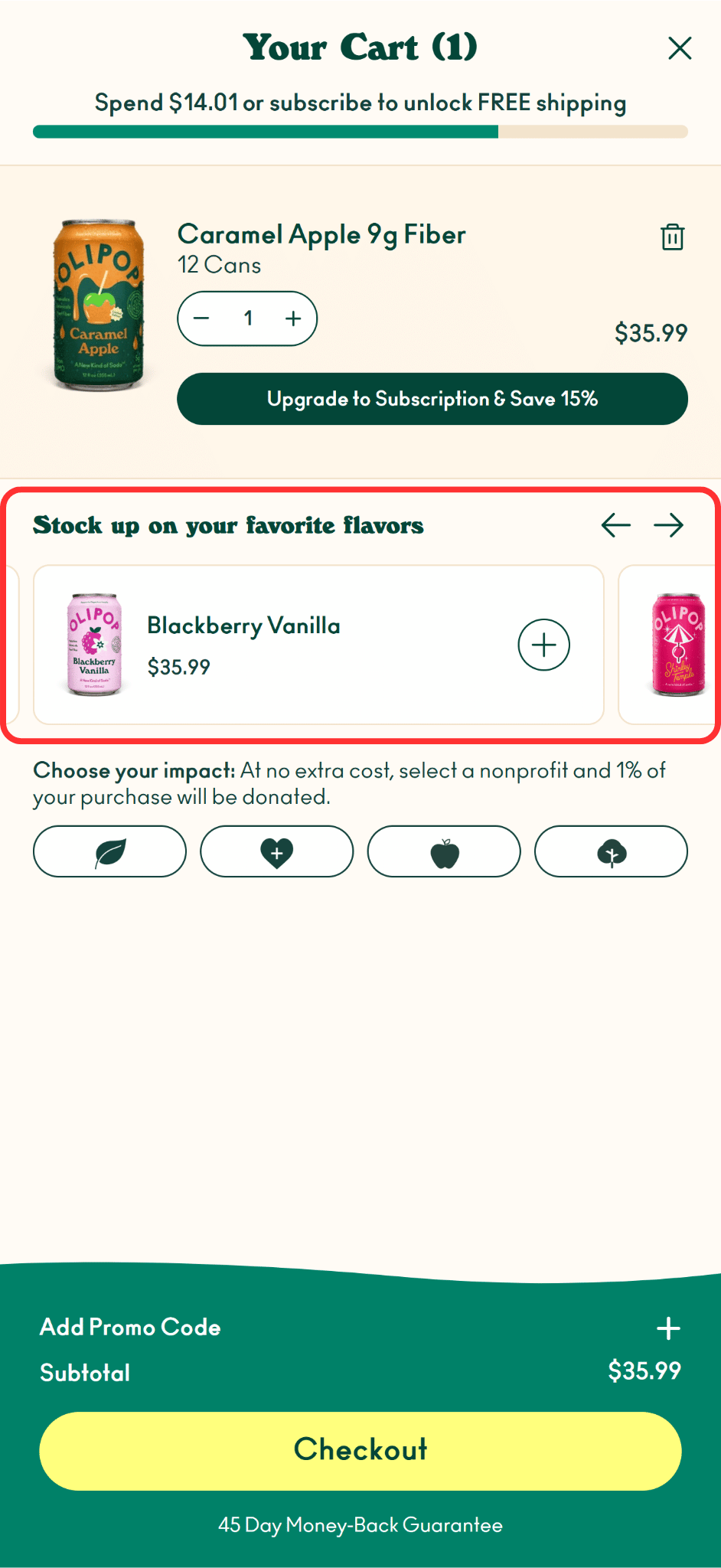
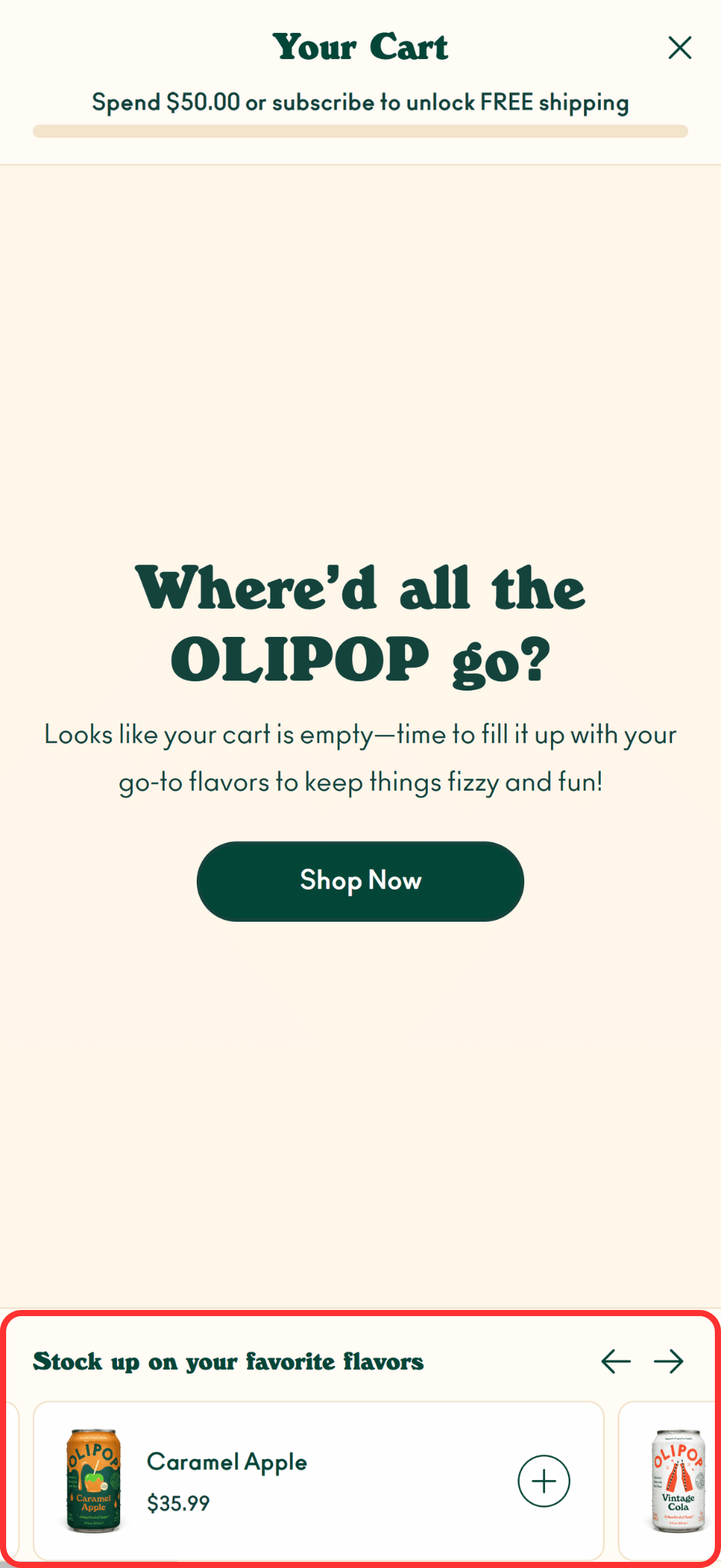
- The "Stock up on your favorite flavors" block comes from the Rebuy upsell app.
- With a product in the cart, it sits right under it.
- When the shopper removes the product, the cart switches to its empty message and the block drops to the bottom of the screen.
- That one shift scores 0.37, more than three times the 0.1 limit.
Why real shoppers score lower than 0.37:
- Most visits never touch the cart. They score close to zero and pull Google's number down.
- Fast phones get a pass. Movement within half a second of a tap does not count, and on a fast connection the cart can update in time.
- Pages differ. Shoppers use the cart more on some pages than others, so home and product score differently.
Bottom line: fixing this one shift is the most likely way to bring both pages under 0.1.
Fix (store owner, with Rebuy support): send Rebuy this section and the recording. Ask for the block to keep the same position whether the cart is full or empty, for example fixed just above the checkout footer.
INP: Response to clicks
INP passes on every page for real shoppers (154ms (Good) for the whole store), so clicks were not tested one by one.
What I test when INP fails
On a slowed down phone, timing each tap and finding what holds it up:
- Picking a variant (flavor, pack size)
- Changing the quantity
- Add to cart, until the item shows in the cart drawer
- Opening the cart and changing a quantity there
- Opening the menu and the search
- Collection filters and sorting
- Opening accordions and closing popups
Heaviest apps
Three apps load on every page, whether the page uses them or not. Keep them, but load them later:
- Videowise (shoppable video), about 2.3 MB on the home page. Load it only on the pages that show a video.
- Rediem (loyalty and rewards widget), about 523 KB. Load it after the page is usable.
- Rebuy (cart upsells), about 469 to 494 KB and up to 308ms of the phone's processing time. Load it when the cart opens.
Fix (store owner): most apps have a setting for this, or their support can do it.
Experiments
Before recommending the product page fix above, I tested it on the live store, without changing it.
How the test works. Chrome DevTools can save a copy of a page, let me edit it, and load that copy in place of the real one (local overrides). The live store never changes and no shopper sees the edit, but the browser loads the page as if the fix were live.
Test conditions:
- Phone: a mid-range phone (Chrome DevTools, mobile view)
- Connection: Fast 4G
- Cache: cleared before every load, so each one is a first visit
- Before: the saved copy, unchanged
- After: the same copy with the edit, so the edit is the only difference
- Result: 5 loads per side, middle result shown
Product page photo
Experiment, Product
Load the product photo right away
- LCP before
- 8.9s
- LCP after
- 1.9s
- LCP change
- -7.0s-79%
In the lab test, LCP dropped from 8.9s to 1.9s, almost five times faster. The main photo now shows about 7 seconds sooner on a slowed down phone.
Watch both loads
Press play to start both together. On the left, the green box stays empty for about 4 seconds. On the right, the photo is there almost as soon as the page appears.
Why it is faster
Two of the four LCP phases got shorter:
- Load delay, the wait before the download starts. Before, the browser could not see the photo until lazysizes had loaded and run. Now its address is in the HTML and it is preloaded, so the download starts as soon as the page arrives.
- Load duration, the download itself. 31 KB instead of 770 KB, so on a phone connection it arrives in a fraction of the time.
What it means for real shoppers
Real shoppers are on faster phones and connections than this test, so they will not save 7 seconds. They wait 3.0s (Needs improvement) for the photo today, and for most of them about 1.8 seconds of that is load delay, the exact phase this fix removes. Cutting most of it should bring the product page under Google's 2.5 second limit. Google's field data will confirm it about four weeks after the fix goes live.
What changed
All three edits from the product page fix, made at once:
| Before | After | |
|---|---|---|
| Main photo | Waits for lazysizes (lazyload class) | Real src in the HTML, fetchpriority="high" |
| Preload | Two bottom-hero images | The main photo |
| Photo size | 3000px, 770 KB | 540px WebP (&transform=resize=540), 31 KB |
Every load
| Load 1 | Load 2 | Load 3 | Load 4 | Load 5 | Middle | |
|---|---|---|---|---|---|---|
| Before | 8.91s | 8.73s | 9.43s | 12.32s | 8.76s | 8.91s |
| After | 2.39s | 1.86s | 1.86s | 1.88s | 1.87s | 1.87s |
Task list
No developer needed
- Ask Rebuy support to keep the cart upsell block in place when a product is removed
- Set Videowise, Rediem and Rebuy to load later, or only on the pages that use them
- List every installed app and remove the ones no longer used
Developer needed
- Put the real product photo in the page's HTML, mark it high priority and preload it
- Serve the product photo at phone size with Accentuate's resize
Worth considering later
- Remove unused classes from the theme's Tailwind build (tailwind.css is 172 KB)
- Defer the theme's blocking scripts and remove the duplicate Intelligems script
Thanks for reading
Want the same paid audit for your store? I'll find what's slowing it down and send you a report like this one, with a video walkthrough, in less than 3 days.
Order my speed audit